
Manufacturing AI data leakage occurs when model development or evaluation uses information that would not be available for the intended decision, or lets dependent records cross a boundary that should represent new production. Split by the actual deployment question, including time, part and lot relationships where relevant, and fit preprocessing on training data only. This fictional image record exposes a misleading random split without inventing a performance score or claiming one split can validate every factory model.
Check whether each feature exists at the decision time.
Keep images of the same part from contaminating evaluation.
Match time and grouping boundaries to the deployment task.
Write the prediction moment in the first line of the brief
Suppose a model must decide whether to flag a part immediately after its camera image is captured. Features may include information genuinely available at that moment. A later final-inspection result can be the target label, but it cannot also be an input to that earlier decision.
Scikit-learn defines leakage through information unavailable at prediction time and warns about learning preprocessing from the test set. The factory-specific task is to trace availability and relationships, not simply remove a column whose name looks suspicious.
| Candidate field | Available at camera decision? | Treatment in this example |
|---|---|---|
| Current image | Yes | Eligible input after method validation |
| Earlier machine reading | Only if genuinely received and valid | Verify timestamp and latency |
| Final inspection disposition | No | Later target/reference, never an earlier input |
| End-of-shift yield summary | No | Exclude from this decision |
| Lot ID | Known, but may encode shortcuts | Review deployment fit and grouping |
See how the image split leaks the part identity
Our illustrative record has 8 physical parts from 4 successive lots, 2 parts per lot, with 3 images per part. There are 24 images. A tempting split assigns images 1 and 2 of every part to training and image 3 to testing.
That creates 16 training images and 8 test images, but every test part was already seen in training. It may test another view of known pieces rather than performance on new parts. No score is reported because no model was trained; the failure is in what the split represents.
Use a split that matches the new-lot question
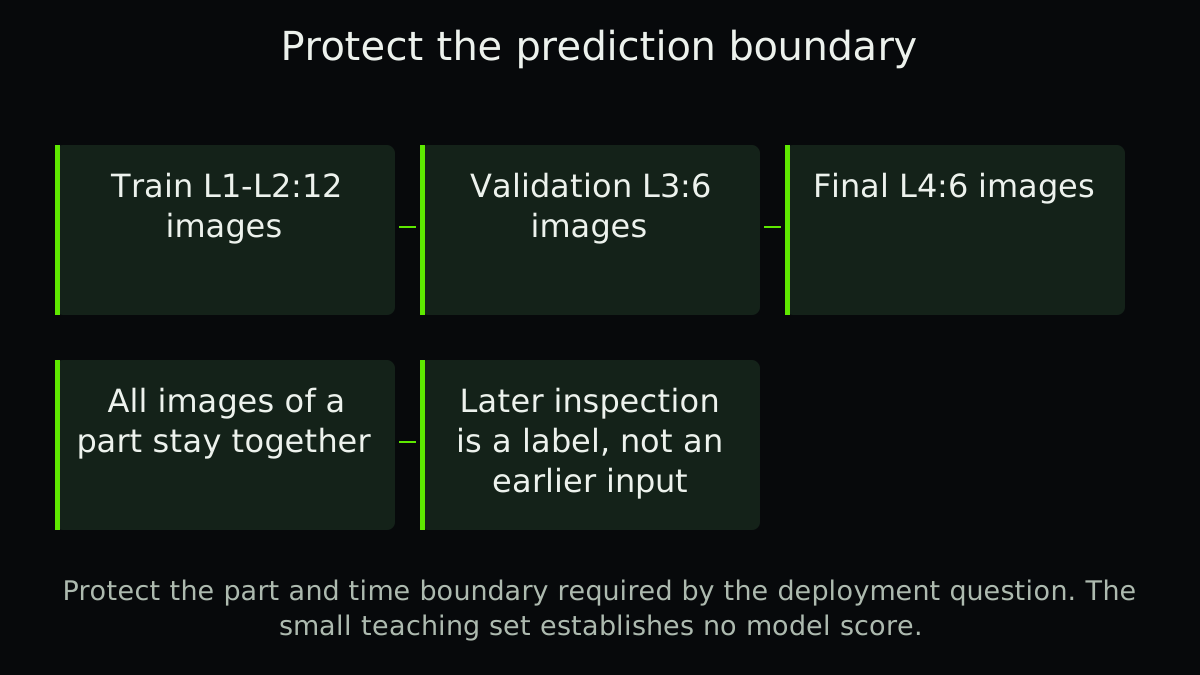
For a teaching new-lot, forward-time evaluation, assign lots L1 and L2 to training:4 parts and 12 images. Reserve L3 for tuning:2 parts and 6 images. Keep L4 as a later final test:2 parts and 6 images. No part or lot crosses those boundaries.
This tiny dataset illustrates separation, not enough evidence for a useful vision model. It also cannot establish performance at a different plant or on unseen defect types. More representative groups and periods are needed for the real deployment question.
All 3 images of a physical part stay together. This protects the stated grouping, but the small counts do not qualify performance.
Combine the right boundaries instead of choosing a split by habit
Group-based splitting can keep related records together. Time-based splitting can test a later period. A generic group splitter does not automatically enforce chronology; a generic time splitter does not automatically prevent a long-lived part or batch from crossing the boundary.
Preserve the index of actual group and time assignments and test it directly. Also check label availability: training at a historical cutoff cannot use outcomes that had not arrived by then. Fit scaling, imputation, feature selection and tuning using only the permitted development data.
- Define deployment and decision time
State the unit, target, feature cutoff and future population to be predicted.
- Map dependence and availability
Identify repeated parts, lots, machines, time overlap and delayed labels.
- Construct and test the split
Verify the exact intended time/group exclusions rather than trusting the splitter name.
- Freeze final evaluation
Keep the held-out data away from feature, model and threshold choices.
Review shortcuts that survive a clean-looking split
A lot code, camera background or operator annotation can act as a shortcut correlated with the target in development but absent or different in use. Examine representative failure examples and relevant subgroup outcomes, not just a single average.
Use attribute agreement analysis to question inconsistent reference labels and inspection thresholds for the separate decision-rule trade-off. Clean splitting cannot repair an invalid target definition.
Retain the evaluation boundary with the model version
The record should identify what was known when, which groups were excluded, what preprocessing was fitted and who could inspect the final test. If the test drives a redesign, call it development evidence and obtain a fresh final evaluation.
The download lists all 24 fictional image assignments and includes blank audit fields. Check the physical parts behind the rows before trusting a test score. A split that answers the wrong question cannot be repaired by a more impressive accuracy number.
A related example from Abolfazl
Compare a valid-looking inventory record with evidence from the shelf.
In English, on founder Abolfazl’s personal blog. This is related reading, not an independent technical source.
Practical checklist
- Write the exact prediction moment.
- Verify feature availability and latency.
- Keep later outcomes out of earlier inputs.
- Identify repeated parts and shared lots.
- Test both time and grouping boundaries.
- Fit preprocessing on permitted training data.
- Keep final test out of threshold tuning.
- Report independent units and limits alongside row counts.
FAQ
FAQ
Sources and further reading
Authoritative references used to research and verify this guide.